

Dumps Moneyack Guarantee - Professional-Cloud-Network-Engineer Dumps UpTo 50% Off
Updated Nov-2025 Pass Professional-Cloud-Network-Engineer Exam - Real Practice Test Questions
To earn the Google Professional-Cloud-Network-Engineer certification, candidates must pass a rigorous exam that covers a wide range of topics, including network architecture, network security, network optimization, and network troubleshooting. Professional-Cloud-Network-Engineer exam consists of multiple-choice and scenario-based questions, and candidates have 2 hours to complete it.
NEW QUESTION # 29
You are troubleshooting an application in your organization's Google Cloud network that is not functioning as expected. You suspect that packets are getting lost somewhere. The application sends packets intermittently at a low volume from a Compute Engine VM to a destination on your on-premises network through a pair of Cloud Interconnect VLAN attachments. You validated that the Cloud Next Generation Firewall (Cloud NGFW) rules do not have any deny statements blocking egress traffic, and you do not have any explicit allow rules. Following Google-recommended practices, you need to analyze the flow to see if packets are being sent correctly out of the VM to isolate the issue. What should you do?
- A. Enable Firewall Rules Logging on your firewall rules and review the logs.
- B. Enable VPC Flow Logs on the subnet that the VM is deployed in with sample_rate = 1.0, and run a query in Logs Explorer to analyze the packet flow.
- C. Verify the network/attachment/egress_dropped_packet.s_count Cloud Interconnect VLAN attachment metric.
- D. Create a packet mirroring policy that is configured with your VM as the source and destined to a collector. Analyze the packet captures.
Answer: B
Explanation:
Enabling VPC Flow Logs with sample_rate = 1.0 on the VM's subnet will give detailed information about network traffic flowing to and from your VM. You can then query this data in Logs Explorer to check whether packets are leaving the VM and reaching the intended destination. This is a recommended practice for troubleshooting such network issues.
NEW QUESTION # 30
You have the networking configuration shown In the diagram Two VLAN attachments associated With two Dedicated Interconnect connections terminate on the same Cloud Router (mycloudrouter). The Interconnect connections terminate on two separate on-premises routers. You advertise the same prefixes from the Border Gateway Protocol (BOP) sessions associated With each Of the VLAN attachments.
You notice an asymmetric traffic flow between the two Interconnect connections. Which of the following actions should you take to troubleshoot the asymmetric traffic flow?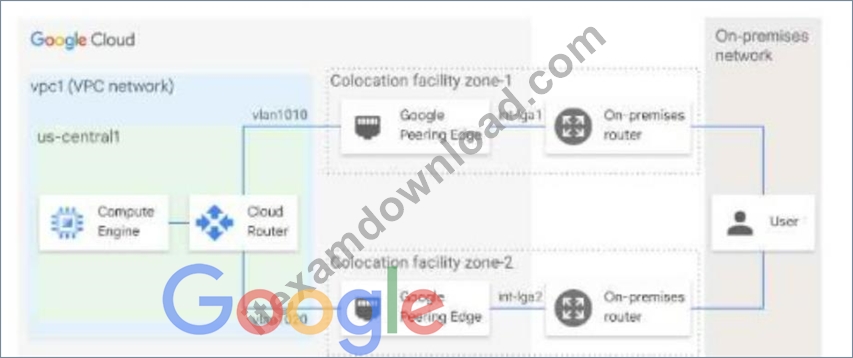
- A. From the Google Cloud console, navigate to Cloud Logging to view VPC Flow Logs and review the results
- B. From the Google Cloud console, navigate to the Hybrid Connectivity select the Cloud Router, and view BGP sessions.
- C. From the Cloud CLI. run gcloud compute routers describe mycloudrouter --region REGION and review the results
- D. From the Cloud CLI, run gcloud compute -protect_ID router get-status mycloudrouter --region REGION and review the results.
Answer: D
Explanation:
The correct answer is B. From the Cloud CLI, run gcloud compute --project_ID router get-status mycloudrouter --region REGION and review the results.
This command will show you the BGP session status, the advertised and learned routes, and the last error for each VLAN attachment. You can use this information to troubleshoot the asymmetric traffic flow and identify any issues with the BGP configuration or the Interconnect connections.
The other options are not correct because:
Option A will only show you the BGP session status, but not the advertised and learned routes or the last error for each VLAN attachment.
Option C will only show you the VPC Flow Logs, which are useful for monitoring and troubleshooting network performance and security issues within your VPC network, but not for your Interconnect connections.
Option D will only show you the basic information about the Cloud Router, such as its name, region, network, and BGP settings, but not the detailed status of each VLAN attachment.
NEW QUESTION # 31
Your company just completed the acquisition of Altostrat (a current GCP customer). Each company has a separate organization in GCP and has implemented a custom DNS solution. Each organization will retain its current domain and host names until after a full transition and architectural review is done in one year. These are the assumptions for both GCP environments.
* Each organization has enabled full connectivity between all of its projects by using Shared VPC.
* Both organizations strictly use the 10.0.0.0/8 address space for their instances, except for bastion hosts (for accessing the instances) and load balancers for serving web traffic.
* There are no prefix overlaps between the two organizations.
* Both organizations already have firewall rules that allow all inbound and outbound traffic from the 10.0.0.0
/8 address space.
* Neither organization has Interconnects to their on-premises environment.
You want to integrate networking and DNS infrastructure of both organizations as quickly as possible and with minimal downtime.
Which two steps should you take? (Choose two.)
- A. Connect VPCs in both organizations using Cloud VPN together with Cloud Router.
- B. Set up some variant of DNS forwarding and zone transfers in each organization.
- C. Use Cloud DNS to create A records of all VMs and resources across all projects in both organizations.
- D. Provision Cloud Interconnect to connect both organizations together.
- E. Create a third organization with a new host project, and attach all projects from your company and Altostrat to it using shared VPC.
Answer: A,B
Explanation:
https://cloud.google.com/dns/docs/best-practices
NEW QUESTION # 32
You ate planning to use Terraform to deploy the Google Cloud infrastructure for your company, The design must meet the following requirements
* Each Google Cloud project must represent an Internal project that your team Will work on
* After an Internal project is finished, the infrastructure must be deleted
* Each Internal project must have Its own Google Cloud project owner to manage the Google Cloud resources.
* You have 10-100 projects deployed at a time
While you are writing the Terraform code, you need to ensure that the deployment is simple and the code is reusable With centralized management What should you do?
- A. Create a Single Shared VPC and attach each Google Cloud project as a service project
- B. Create a Shared VPC and service project for each internal project
- C. Create a Single project and Single VPC for each internal project
- D. Create a Single project and additional VPCs for each internal project
Answer: B
Explanation:
The correct answer is D because it meets the following requirements:
* Each internal project has its own Google Cloud project, which can be easily created and deleted by Terraform using the google_project resource1.
* Each internal project has its own Google Cloud project owner, which can be assigned by Terraform using the google_project_iam_member resource1.
* The deployment is simple and the code is reusable with centralized management, because the Shared VPC allows you to connect multiple service projects to a single host project that contains the network resources2. This way, you can use Terraform modules to create and manage the network resources in the host project, and then reference them in the service projects3.
Option A is incorrect because it does not create separate Google Cloud projects for each internal project, which makes it harder to delete the infrastructure and assign project owners. Option B is incorrect because it does not create separate Google Cloud projects for each internal project, and also because it attaches the service projects to a Shared VPC, which is not recommended for short-lived projects2. Option C is incorrect because it does not use a Shared VPC, which means that each internal project has to create and manage its own network resources, which increases complexity and reduces reusability.
NEW QUESTION # 33
You are increasing your usage of Cloud VPN between on-premises and GCP, and you want to support more traffic than a single tunnel can handle. You want to increase the available bandwidth using Cloud VPN.
What should you do?
- A. Add a second Cloud VPN gateway in a different region than the existing VPN gateway. Create a new tunnel on the second Cloud VPN gateway that forwards the same IP range, but points to the existing on-premises VPN gateway IP address.
- B. Create two VPN tunnels on the same Cloud VPN gateway that point to the same destination VPN gateway IP address.
- C. Add a second on-premises VPN gateway with a different public IP address. Create a second tunnel on the existing Cloud VPN gateway that forwards the same IP range, but points at the new on-premises gateway IP.
- D. Double the MTU on your on-premises VPN gateway from 1460 bytes to 2920 bytes.
Answer: C
Explanation:
Explanation/Reference:
NEW QUESTION # 34
All the instances in your project are configured with the custom metadata enable-oslogin value set to FALSE and to block project-wide SSH keys. None of the instances are set with any SSH key, and no project-wide SSH keys have been configured. Firewall rules are set up to allow SSH sessions from any IP address range. You want to SSH into one instance.
What should you do?
- A. Open the Cloud Shell SSH into the instance using gcloud compute ssh.
- B. Set the custom metadata enable-oslogin to TRUE, and SSH into the instance using a third-party tool like putty or ssh.
- C. Generate a new SSH key pair. Verify the format of the public key and add it to the project.
SSH into the instance using a third-party tool like putty or ssh. - D. Generate a new SSH key pair. Verify the format of the private key and add it to the instance.
SSH into the instance using a third-party tool like putty or ssh.
Answer: B
Explanation:
https://cloud.google.com/compute/docs/storing-retrieving-metadata
NEW QUESTION # 35
You just finished your company's migration to Google Cloud and configured an architecture with 3 Virtual Private Cloud (VPC) networks: one for Sales, one for Finance, and one for Engineering. Every VPC contains over 100 Compute Engine instances, and now developers using instances in the Sales VPC and the Finance VPC require private connectivity between each other. You need to allow communication between Sales and Finance without compromising performance or security. What should you do?
- A. Configure the instances that require communication between each other with an external IP address.
- B. Configure Cloud NAT and a Cloud Router in the Sales and Finance VPCs.
- C. Create a VPC Network Peering connection between the Finance VPC and the Sales VPC.
- D. Configure an HA VPN gateway between the Finance VPC and the Sales VPC.
Answer: C
NEW QUESTION # 36
You are using the gcloud command line tool to create a new custom role in a project by coping a predefined role. You receive this error message:
INVALID_ARGUMENT: Permission resourcemanager.projects.list is not valid What should you do?
- A. Add the resourcemanager.projects.get permission, and try again.
- B. Add the resourcemanager.projects.setIamPolicy permission, and try again.
- C. Remove the resourcemanager.projects.list permission, and try again.
- D. Try again with a different role with a new name but the same permissions.
Answer: C
NEW QUESTION # 37
You have recently been put in charge of managing identity and access management for your organization.
You have several projects and want to use scripting and automation wherever possible. You want to grant the editor role to a project member.
Which two methods can you use to accomplish this? (Choose two.)
- A. gcloud projects add-iam-policy-binding Sprojectname --member user:Susername --role roles/editor
- B. GetIamPolicy() via REST API
- C. gcloud pubsub add-iam-policy-binding Sprojectname --member user:Susername --role roles/editor
- D. setIamPolicy() via REST API
- E. Enter an email address in the Add members field, and select the desired role from the drop-down menu in the GCP Console.
Answer: A,E
NEW QUESTION # 38
You are responsible for enabling Private Google Access for the virtual machine (VM) instances in your Virtual Private Cloud (VPC) to access Google APIs. All VM instances have only a private IP address and need to access Cloud Storage. You need to ensure that all VM traffic is routed back to your on-premises data center for traffic scrubbing via your existing Cloud Interconnect connection. However, VM traffic to Google APIs should remain in the VPC. What should you do?
- A. Delete the default route in your VPC and configure your on-premises router to advertise 0.0.0.0/0 via Border Gateway Protocol (BGP).
Create a public Cloud DNS zone with a CNAME for *.google.com to private googleapis com, create a CNAME for * googleapis.com to private googleapis com, and create an A record for Private googleapis.
com that resolves to the addresses in 199.36.153 8/30.
Create a static route in your VPC for the range 199 .36.153.8/30 with the default internet gateway as the next hop. - B. Configure your on-premises router to advertise 0.0.0.0/0 via Border Gateway Protocol (BGP) with a lower priority (MED) than the default VPC route.
Create a private Cloud DNS zone for googleapis.com, create a CNAME for * googieapis.com to private googleapis com, and create an A record for private.googleapis.com that resolves to the addresses in 199
.36.153.8/30.
Create a static route in your VPC for the range 199.36. 153.8/30 with the default internet gateway as the next hop. - C. Delete the default route in your VPC and configure your on-premises router to advertise 0.0.0.0/0 via Border Gateway Protocol (BGP).
Create a private Cloud DNS zone for googleapis.com, create a CNAME for * googieapis.com to Private googleapis.com, and create an A record for private.googleapis.com that resolves to the addresses in
199.36.153.8/30.Create a static route in your VPC for the range 199.36.153.8/30 with the default internet gateway as the next hop. - D. Delete the default route in your VPC.
Create a private Cloud DNS zone for googleapis.com, create a CNAME for *.googleapis.com to restricted googleapis.com, and create an A record for restricted googleapis com that resolves to the addresses in 199.36.153.4/30.
Create a static route in your VPC for the range 199.36.153.4/30 with the default internet gateway as the next hop.
Answer: B
NEW QUESTION # 39
You are configuring an HA VPN connection between your Virtual Private Cloud (VPC) and on-premises network. The VPN gateway is named VPN_GATEWAY_1. You need to restrict VPN tunnels created in the project to only connect to your on-premises VPN public IP address: 203.0.113.1/32. What should you do?
- A. Configure the Resource Manager constraint constraints/compute.restrictVpnPeerIPs to use an allowList consisting of only the 203.0.113.1/32 address.
- B. Configure a Google Cloud Armor security policy, and create a policy rule to allow 203.0.113.1/32.
- C. Configure an access control list on the peer VPN gateway to deny all traffic except 203.0.113.1/32, and attach it to the primary external interface.
- D. Configure a firewall rule accepting 203.0.113.1/32, and set a target tag equal to VPN_GATEWAY_1.
Answer: A
NEW QUESTION # 40
Your on-premises data center has 2 routers connected to your Google Cloud environment through a VPN on each router. All applications are working correctly; however, all of the traffic is passing across a single VPN instead of being load-balanced across the 2 connections as desired.
During troubleshooting you find:
* Each on-premises router is configured with a unique ASN.
* Each on-premises router is configured with the same routes and priorities.
* Both on-premises routers are configured with a VPN connected to a single Cloud Router.
* BGP sessions are established between both on-premises routers and the Cloud Router.
* Only 1 of the on-premises router's routes are being added to the routing table.
What is the most likely cause of this problem?
- A. You do not have a load balancer to load-balance the network traffic.
- B. The ASNs being used on the on-premises routers are different.
- C. A firewall is blocking the traffic across the second VPN connection.
- D. The on-premises routers are configured with the same routes.
Answer: B
NEW QUESTION # 41
You create multiple Compute Engine virtual machine instances to be used as TFTP servers.
Which type of load balancer should you use?
- A. HTTP(S) load balancer
- B. Network load balancer
- C. TCP proxy load balancer
- D. SSL proxy load balancer
Answer: B
Explanation:
"TFTP is a UDP-based protocol. Servers listen on port 69 for the initial client-to-server packet to establish the TFTP session, then use a port above 1023 for all further packets during that session. Clients use ports above 1023" https://docstore.mik.ua/orelly/networking_2ndEd/fire/ch17_02.htm Besides, Google Cloud external TCP/UDP Network Load Balancing (after this referred to as Network Load Balancing) is a regional, non-proxied load balancer. Network Load Balancing distributes traffic among virtual machine (VM) instances in the same region in a Virtual Private Cloud (VPC) netw
NEW QUESTION # 42
You want to apply a new Cloud Armor policy to an application that is deployed in Google Kubernetes Engine (GKE). You want to find out which target to use for your Cloud Armor policy.
Which GKE resource should you use?
- A. GKE Pod
- B. GKE Node
- C. GKE Ingress
- D. GKE Cluster
Answer: C
Explanation:
Cloud Armour is applied at load balancers Configuring Google Cloud Armor through Ingress. https://cloud.
google.com/kubernetes-engine/docs/how-to/ingress-features Security policy features Google Cloud Armor security policies have the following core features: You can optionally use the QUIC protocol with load balancers that use Google Cloud Armor. You can use Google Cloud Armor with external HTTP(S) load balancers that are in either Premium Tier or Standard Tier. You can use security policies with GKE and the default Ingress controller.
NEW QUESTION # 43
You are deploying an HA VPN within Google Cloud. You need to exchange routes dynamically between your on-premises gateway and Google Cloud. You have already created an HA VPN gateway and a peer VPN gateway resource. What should you do?
- A. Create a second HA VPN gateway, add VPN tunnels, and enable global dynamic routing.
- B. Create a Cloud Router, add VPN tunnels, and enable global dynamic routing.
- C. Create a Cloud Router, add VPN tunnels, and then configure BGP sessions.
- D. Create a Cloud Router, add VPN tunnels, and then configure static routes to your subnet ranges.
Answer: C
Explanation:
To dynamically exchange routes between Google Cloud and your on-premises gateway, you need to create a Cloud Router and configure BGP sessions after adding VPN tunnels. BGP allows for dynamic route exchange, which is essential for establishing proper communication between the environments.
NEW QUESTION # 44
Your organization is deploying a single project for 3 separate departments. Two of these departments require network connectivity between each other, but the third department should remain in isolation. Your design should create separate network administrative domains between these departments. You want to minimize operational overhead.
How should you design the topology?
- A. Create a Shared VPC Host Project and the respective Service Projects for each of the 3 separate departments.
- B. Create a single project, and deploy specific firewall rules. Use network tags to isolate access between the departments.
- C. Create 3 separate VPCs, and use VPC peering to establish connectivity between the two appropriate VPCs.
- D. Create 3 separate VPCs, and use Cloud VPN to establish connectivity between the two appropriate VPCs.
Answer: C
Explanation:
https://cloud.google.com/vpc/docs/vpc-peering
NEW QUESTION # 45
You want to set up two Cloud Routers so that one has an active Border Gateway Protocol (BGP) session, and the other one acts as a standby.
Which BGP attribute should you use on your on-premises router?
- A. AS-Path
- B. Multi-exit Discriminator
- C. Community
- D. Local Preference
Answer: B
Explanation:
https://cloud.google.com/router/docs/concepts/overview
NEW QUESTION # 46
Your team deployed two applications in GKE that are exposed through an external Application Load Balancer. When queries are sent to www.mountkirkgames.com/sales and www.mountkirkgames.com/get-an- analysis, the correct pages are displayed. However, you have received complaints that www.mountkirkgames.
com yields a 404 error. You need to resolve this error. What should you do?
- A. Review the Ingress YAML file. Add a new path rule for the * character that directs to the base service.
Reapply the YAML. - B. Review the Ingress YAML file. Define the default backend. Reapply the YAML.
- C. Review the Service YAML file. Add a new path rule for the * character that directs to the base service.Reapply the YAML.
- D. Review the Service YAML file. Define a default backend. Reapply the YAML.
Answer: B
Explanation:
Explanation: The 404 error is occurring because there is no default backend defined for requests to the root URL. Defining the default backend in the Ingress YAML file ensures that requests to www.mountkirkgames.
com are routed to the correct service.
: Google Cloud GKE Ingress Setup
NEW QUESTION # 47
Your organization is implementing a new security policy to control how firewall rules are applied to control flows between virtual machines (VMs). Using Google-recommended practices, you need to set up a firewall rule to enforce strict control of traffic between VM A and VM B. You must ensure that communications flow only from VM A to VM B within the VPC, and no other communication paths are allowed. No other firewall rules exist in the VPC. Which firewall rule should you configure to allow only this communication path?
- A. Firewall rule direction: ingress
Action: allow
Target: specific VM A tag
Source ranges: VM B tag and VM B source IP address
Priority: 100 - B. Firewall rule direction: ingress
Action: allow
Target: VM B service account
Source ranges: VM A service account
Priority: 1000 - C. Firewall rule direction: ingress
Action: allow
Target: VM A service account
Source ranges: VM B service account and VM B source IP address
Priority: 100 - D. Firewall rule direction: ingress
Action: allow
Target: specific VM B tag
Source ranges: VM A tag and VM A source IP address
Priority: 1000
Answer: A
NEW QUESTION # 48
Your company's security team wants to limit the type of inbound traffic that can reach your web servers to protect against security threats. You need to configure the firewall rules on the web servers within your Virtual Private Cloud (VPC) to handle HTTP and HTTPS web traffic for TCP only. What should you do?
- A. Create an allow on match egress firewall rule with the target tag "web-server" to allow all IP addresses for TCP port 80.
- B. Create an allow on match egress firewall rule with the target tag "web-server" to allow web server IP addresses for TCP ports 60 and 443.
- C. Create an allow on match ingress firewall rule with the target tag "web-server" to allow all IP addresses for TCP ports 80 and 443.
- D. Create an allow on match ingress firewall rule with the target tag "web-server" to allow all IP addresses for TCP port 80.
Answer: C
NEW QUESTION # 49
Question:
Recently, your networking team enabled Cloud CDN for one of the external-facing services that is exposed through an external Application Load Balancer. The application team has already defined which content should be cached within the responses. Upon testing the load balancer, you did not observe any change in performance after the Cloud CDN enablement. You need to resolve the issue. What should you do?
- A. Configure the FORCE_CACHE_ALL caching mode on Cloud CDN to ensure all appropriate content is cached.
- B. Configure the CACHE_MAX_STATIC caching mode on Cloud CDN to ensure Cloud CDN caches content depending on responses from the backends.
- C. Configure the CACHE_ALL_STATIC caching mode on Cloud CDN to ensure Cloud CDN caches all static content as well as content defined by the backends.
- D. Configure the USE_ORIGIN_HEADERS caching mode on Cloud CDN to ensure Cloud CDN caches content based on response headers from the backends.
Answer: D
Explanation:
When enabling Cloud CDN, for caching behavior to follow the application-defined caching headers, you need to configure the USE_ORIGIN_HEADERS caching mode. This setting ensures that the Cloud CDN respects the cache control headers specified by the backend, allowing the application-defined caching rules to dictate what content gets cached. This is often required when specific caching directives are already set by the application.
NEW QUESTION # 50
......
Download Free Google Professional-Cloud-Network-Engineer Real Exam Questions: https://www.itexamdownload.com/Professional-Cloud-Network-Engineer-valid-questions.html
Pass Your Exam With 100% Verified Professional-Cloud-Network-Engineer Exam Questions: https://drive.google.com/open?id=1rmZp-AR-WNBoT8oEe0DVYlV-j7qaY-j5